Setup guide
Connect athletedata to Perplexity
Add athletedata as a custom connector in Perplexity, so you can ask Perplexity about your real training data.
Open the Connectors menu
In Perplexity's prompt box (the one that says Ask anything), click the + button, hover Connectors, then click Manage Connectors at the bottom of the submenu.
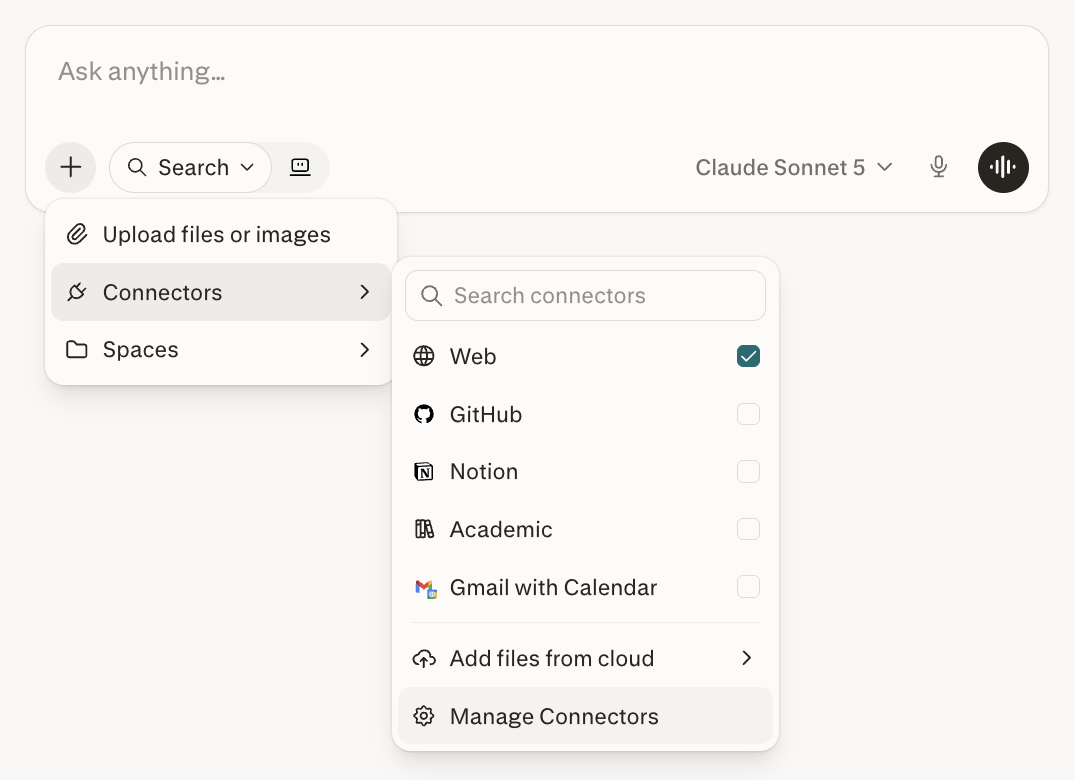
Add a custom connector
On the Connectors page, click + Add custom connector in the top right, then choose Add custom connector from the dropdown (not Connect your own API).

Fill out the form
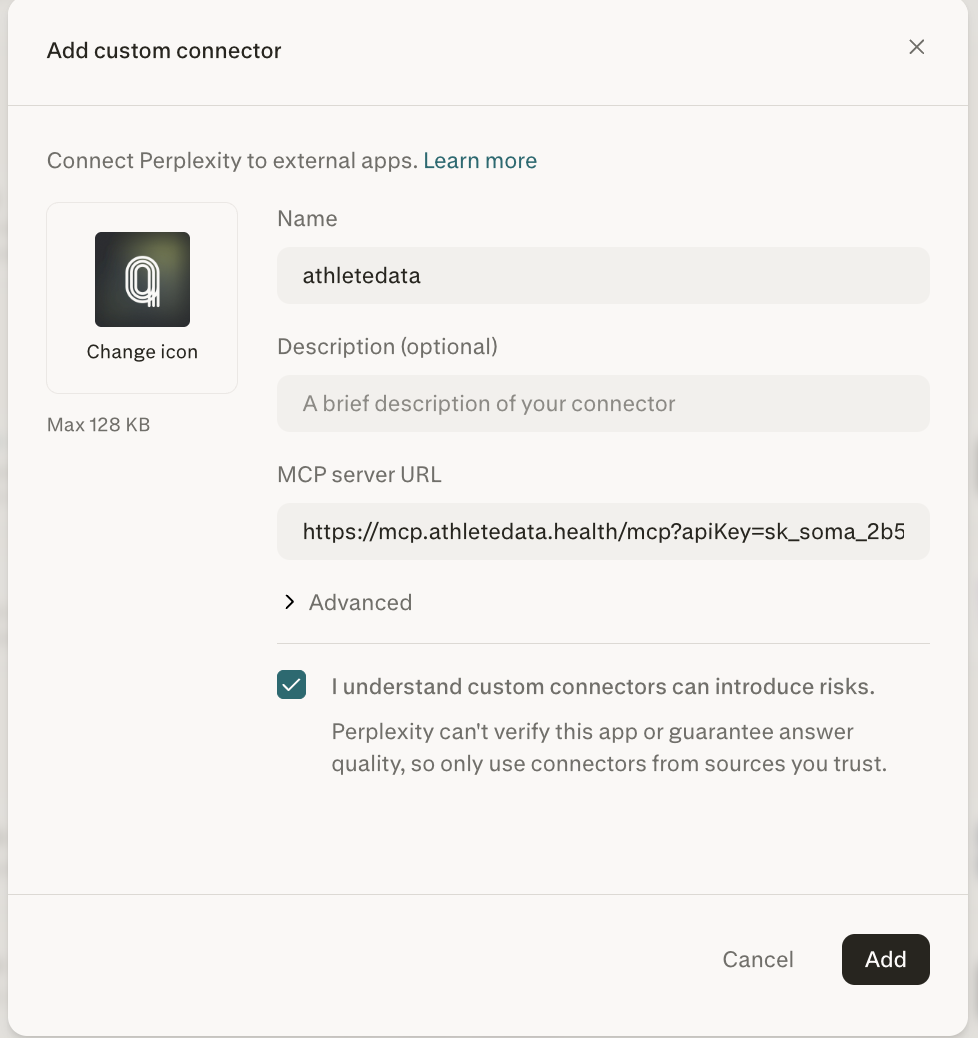
The Add custom connector dialog opens. Fill it out:
- Name:
athletedata - Icon (optional): hit Change icon and upload ours if a blank tile offends you - grab the athletedata icon (fits the 128 KB limit with room to spare). Purely cosmetic - your HRV looks the same either way.
- Description: optional - leave it blank or write something like "My training data".
- MCP server URL: paste your full MCP URL from the Copy MCP URL button on your dashboard. It already includes your API key and looks like
https://mcp.athletedata.health/mcp?apiKey=sk_soma_... - Expand Advanced and set Authentication to None (the dropdown offers OAuth / API Key / None - pick None). Perplexity defaults it to OAuth, which fails against athletedata - your key is already in the URL, so there's no OAuth to register. Leave Transport (Streamable HTTP) and Network access (Public) at their defaults.
- Tick I understand custom connectors can introduce risks.

Then click Add.
Server does not support automatic registration error. athletedata authenticates with the key already in your URL (the ?apiKey= part), so switch Authentication to None and leave Client ID / Client Secret blank.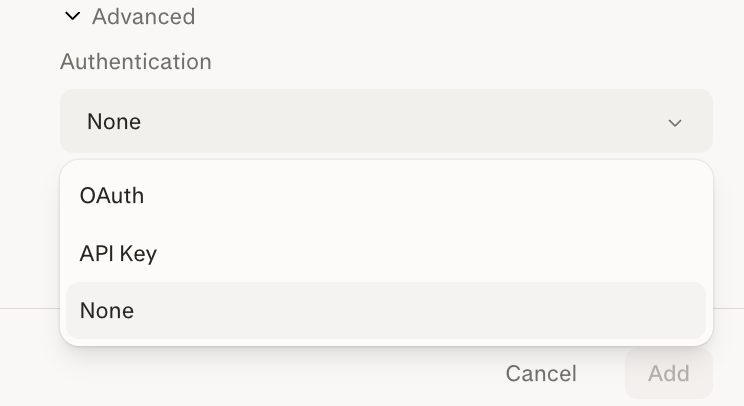
Start asking
The athletedata connector now appears in your Connectors list and under + → Connectors in the prompt box. Make sure it's enabled (checked) for your question.
Perplexity is at its best when it pairs your data with live web research, so these prompts pull your real numbers and ask it to cite what the science says. Copy one to start, then tweak the bracketed bits:
Use my connected athletedata to pull my last 12 weeks of training: weekly hours by sport, my fitness, fatigue and form (CTL/ATL/TSB), and my best recent efforts. I'm targeting [a sub-1:45 half marathon on October 5 - change to your race and goal]. Tell me whether my current fitness is on track, research the taper and peak-week protocols that work best for this event, and lay out a week-by-week plan to the start line. Cite your sources.
Look at my last 30 days of HRV, resting heart rate and sleep from athletedata and describe the trend. Then search current sports-science research on what that HRV trajectory means for training readiness, and give me an evidence-based call for this week - push, hold, or back off. Link the studies you rely on.
Pull my VO2max, resting heart rate, weekly training load and recent pace or power curves from athletedata. Research how these compare to age-group norms for [a 35-year-old endurance athlete - change to your age and sport], and what current research says they predict about performance and longevity. Be specific about where I'm strong and where I'm average, and cite your sources.
On the first question you may need to mention the connector by name (“use the athletedata connector to...”) so Perplexity reaches for it.
Not working?
- Seeing
[API_CLIENTS_ERROR] Server does not support automatic registrationor being asked for a Client ID / Client Secret? Your Authentication dropdown is set to OAuth. Expand Advanced, switch it to None, and click Add again - athletedata uses the key in the URL, not OAuth. - Make sure the URL you pasted contains
?apiKey=followed by your full key - if you only pastedhttps://mcp.athletedata.health/mcp, the connector will fail. - Make sure the athletedata connector is enabled (checked) in the + → Connectors menu for the question you're asking.
- Don't see the option to add a custom connector? Custom connectors need a paid Perplexity plan (Pro, Max, or Enterprise) - the free tier can't add them.
- Make sure your athletedata subscription is active - check your billing page.
- Connect at least one app (Garmin, WHOOP, Oura, etc.) on the integrations page - otherwise the tools have nothing to query.
- Stuck? Email team@athletedata.health and we'll help directly.
New to athletedata?
athletedata pulls your training, sleep and recovery out of 35 apps - Garmin, WHOOP, Oura, Apple Health, Hevy and the rest of your stack - and keeps it in one place. This guide is how you point the AI you already use at it. You just need an account first.
Works with Claude, ChatGPT, Cursor, Perplexity and Lovable. Cancel anytime.