Connect athletedata to Gemini
Heads up: you need a Google AI Pro plan (or Ultra). On the free plan Gemini lets you add athletedata but never actually reads your data. Google also limits custom apps to personal Google accounts (not work or school), 18 or over, in the US, with your Google account set to English.
Once it is set up, ask Gemini about your real training, sleep and recovery data.
- 1On a computer, go to gemini.google.com, click Customize in the sidebar, then Connectors and + Custom.
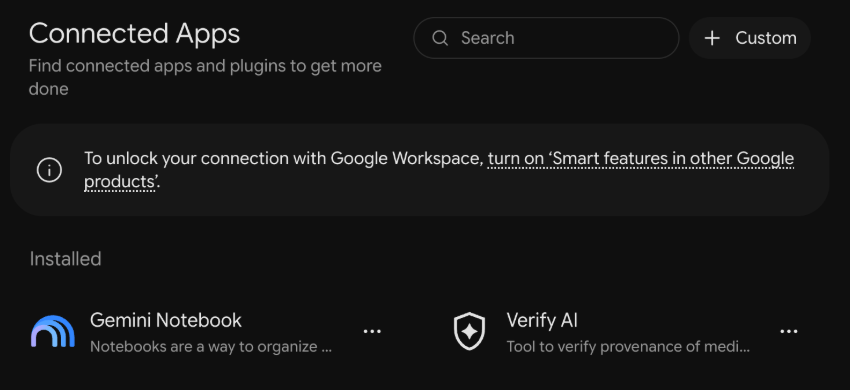
- 2Paste
https://mcp.athletedata.health/mcpand click Next. - 3Sign in to athletedata when asked and allow access. That is it: the app also works in the Gemini mobile app from now on.
Type @, pick athletedata from the list, then ask something like “how did I sleep last night?” Gemini asks you to confirm before it changes anything, like pushing a workout to your watch.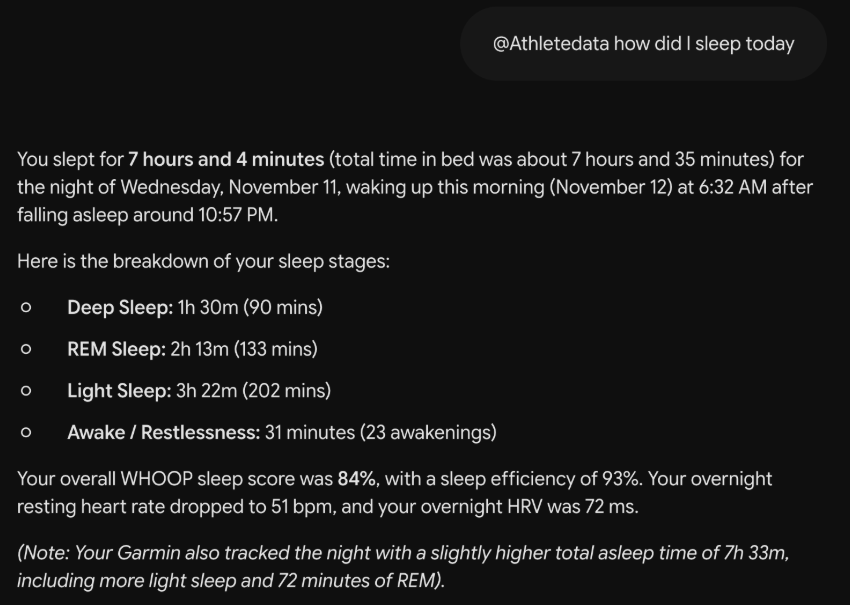
Not working?⌄
- No + Custom button? Check that you are signed in with a personal Google account and that your Google account language is English (myaccount.google.com/language). Gemini Apps Activity also has to be on.
- Gemini says it cannot see your data? Check that you are on Google AI Pro, and pick athletedata from the @ list instead of typing the name.
- Your athletedata subscription has to be active (billing), and at least one app has to be connected on the integrations page.
- Still stuck? Email team@athletedata.health.
New to athletedata?
athletedata pulls your training, sleep and recovery out of 41 apps - Garmin, WHOOP, Oura, Apple Health, Hevy and the rest of your stack - and keeps it in one place. This guide is how you point the AI you already use at it. You just need an account first.
Works with Claude, ChatGPT, Cursor, Perplexity, Gemini and Lovable. Cancel anytime.